

Even seasoned engineers occasionally pause before deciding whether a change belongs in a Patch, Minor, or Major release.
Some decisions are straightforward. Removing a public method is breaking. Adding an independent public type is normally additive. Correcting an internal implementation detail without changing observable behavior is usually a Patch.
The difficult decisions live between those clear examples.
Is a bug fix still a Patch when it changes an exception that consumers may catch? Is a new overload always a Minor addition, or can it make existing calls ambiguous? Does adding a member to an interface count as an additive feature when downstream consumers implement that interface? What happens when a package drops an older target framework without changing a single C# signature?
These questions require more than intuition or a quick look at the public API diff.
That is why Codebelt includes .NET Change Impact: an agentic skill that classifies changes to .NET libraries and NuGet packages and recommends the appropriate Major, Minor, or Patch release.
The skill is designed to turn release classification from an informal judgment call into a structured compatibility assessment.
Note
.NET Change Impact treats Microsoft’s .NET library change rules and compatibility categories as normative guidance. Codebelt does not introduce a competing definition of compatibility; it makes the established .NET guidance easier to apply during everyday development.
Release classification is a compatibility decision
Semantic Versioning provides a simple release vocabulary:
- Major for incompatible changes,
- Minor for backward-compatible functionality,
- Patch for backward-compatible fixes and maintenance.
The vocabulary is simple. Applying it correctly to a real .NET change set is not.
A version bump should not be selected from the wording of a commit subject or the developer’s intent alone. Terms such as fix, refactor, cleanup, and improvement describe why work was performed, but they do not reliably describe its effect on consumers.
A bug fix can introduce a breaking behavioral change.
A refactor can change serialization or exception behavior.
A performance optimization can change timing, ordering, concurrency, or resource lifetime.
An additive API can create source ambiguity.
A dependency update can alter transitive types, supported frameworks, binding behavior, or runtime semantics.
The deciding question is therefore not merely:
What kind of work did we perform?
It is:
Can existing consumers adopt the new release without modifying their code, rebuilding unexpectedly, changing their environment, or observing incompatible behavior?
That consumer-oriented question is the foundation of the Codebelt classification model.
Compatibility has more than one dimension
A public API comparison is valuable, but it only describes part of the compatibility contract.
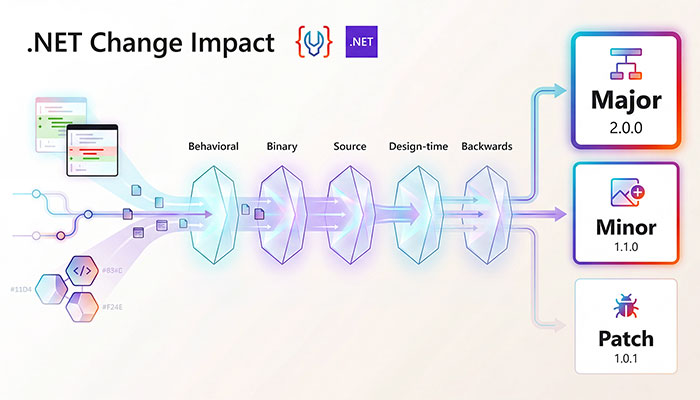
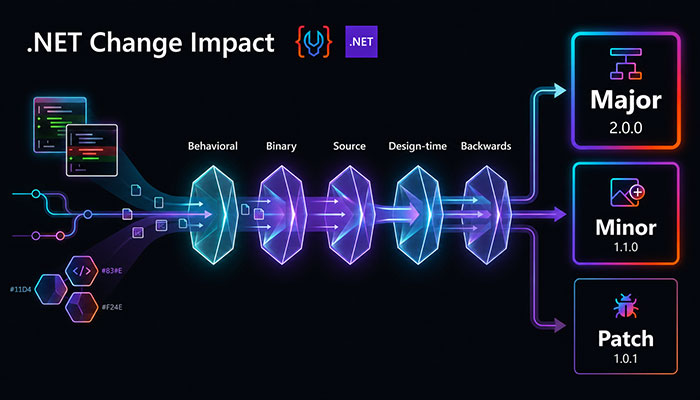
.NET Change Impact evaluates a release through five complementary dimensions.
| Compatibility dimension | Question |
|---|---|
| Behavioral change | Can consumers observe different return values, exceptions, validation, ordering, formatting, serialization, timing, side effects, or other runtime behavior? |
| Binary compatibility | Can assemblies compiled against the previous release still load and execute against the new release without recompilation? |
| Source compatibility | Can existing consumer source code compile against the new release without modification? |
| Design-time compatibility | Do package restore, builds, analyzers, source generators, MSBuild targets, tooling, and IDE workflows continue to work? |
| Backwards compatibility | Can an existing consumer adopt the new release unmodified and continue to compile, build, run, and behave equivalently? |
This broader view prevents one of the most common classification mistakes:
The public API did not change, so the release cannot be breaking.
A method can retain exactly the same signature while beginning to throw a different exception, rejecting previously accepted input, returning results in a different order, emitting different serialized data, or changing when work is performed.
The code may still compile. Existing binaries may still load. The behavior can nevertheless be incompatible.
Major changes: breaking or plausibly breaking
Recommend a Major release when a change breaks, or can reasonably break, an existing consumer.
Common examples include:
- removing or renaming a public type or member,
- changing a public signature, parameter order, return type, or generic constraint,
- making an API less accessible,
- changing assembly identity, package identity, strong naming, or namespace placement,
- removing a supported target framework, runtime, operating system, or architecture,
- adding a required member to an existing public interface,
- changing serialization, persisted data, wire formats, equality, hashing, parsing, or formatting incompatibly,
- introducing stricter validation that rejects previously accepted consumer input,
- changing analyzer, generator, build, or restore behavior so existing projects fail by default,
- making existing source fail to compile or existing binaries fail to load.
A Major recommendation does not mean the change is wrong. Breaking changes are sometimes necessary.
It means the release must communicate the impact honestly so consumers can choose when and how to adopt it.
Public interfaces require particular care
Adding a method to an existing public interface may look additive from the package author’s perspective:
public interface IMessageSink
{
    Task SendAsync(Message message);

    Task FlushAsync();
}
However, every external implementation of IMessageSink must now provide FlushAsync. Existing consumer source may stop compiling.
That is usually a Major change.
Default interface implementations can reduce some of the immediate source-compatibility risk, but they do not make the change automatically safe. Language support, runtime support, inheritance rules, design-time behavior, and observable semantics still require evaluation.
Minor changes: backward-compatible functionality
Recommend a Minor release when functionality is added without breaking existing source, binaries, builds, or behavior.
Common examples include:
- adding a new public type,
- adding a new independent method or property,
- adding a backward-compatible constructor or extension method,
- adding an opt-in feature,
- adding support for another target framework or platform,
- introducing optional configuration,
- adding warnings-only diagnostics that do not break existing builds,
- adding package capabilities while preserving all existing contracts.
For example:
public sealed class RetryPolicy
{
}
Adding a new RetryPolicy type without changing existing APIs is normally a Minor release. Existing consumers remain valid, while new consumers can opt into the added functionality.
Additive does not always mean harmless
Some additions need closer examination.
A new overload is usually Minor, but it can change overload resolution:
public void Write(string value);
public void Write(ReadOnlySpan<char> value);
Existing source might become ambiguous or bind differently after recompilation.
Similarly, adding an enum value is usually Minor, but it can affect consumers that:
- use exhaustive switch expressions,
- assume the enum is a closed set,
- serialize numeric or textual enum representations,
- validate values against a fixed list.
The skill therefore treats Minor as a compatibility conclusion, not simply as a synonym for something was added.
Patch changes: compatible fixes and maintenance
Recommend a Patch release when the public contract remains intact and no new public functionality is introduced.
Typical Patch changes include:
- compatible bug fixes,
- internal implementation changes,
- refactoring with no observable consumer impact,
- compatible dependency updates,
- documentation corrections,
- CI, test, build, or packaging maintenance,
- security fixes that preserve compatibility,
- performance improvements that do not change semantics.
For example, correcting a NullReferenceException inside an internal cache implementation is normally a Patch when:
- the affected type is not part of the public contract,
- consumer-visible behavior remains consistent,
- no supported platform or framework changes,
- no new build or runtime requirement is introduced.
A bug fix is not automatically a Patch
Consider this change:
public DateTime? Parse(string value)
Previously, Parse("") returned null. It now throws FormatException.
The signature has not changed, but the observable contract has.
Whether that should be classified as Major depends on facts such as:
- whether the method is public,
- whether returning
nullwas documented, - whether the previous behavior was predictable,
- whether consumers may reasonably depend on it,
- whether callers already handle the new exception,
- whether the old behavior was clearly invalid or merely undesirable.
Calling the change a bug fix does not settle the compatibility question.
Codebelt deliberately surfaces that uncertainty instead of automatically approving a Patch release.
Practical classification examples
| Change | Usual classification | Important qualification |
|---|---|---|
| Remove a public method | Major | Breaks source and binary compatibility. |
| Rename a public property | Major | Existing source and compiled consumers reference the old name. |
| Add a new independent public type | Minor | Provided existing contracts and behavior remain unchanged. |
| Add a new overload | Minor | Escalate if existing calls become ambiguous or bind differently. |
| Add a member to a public interface | Major | Existing external implementations may no longer compile. |
| Add an enum value | Minor | Examine exhaustive switches and serialization contracts. |
| Remove or rename an enum value | Major | Can break source, behavior, and serialized data. |
| Fix an internal implementation defect | Patch | Provided the fix does not alter observable behavior. |
| Change a public exception contract | Potentially Major | Source and binary compatibility can remain intact while behavior breaks. |
| Update an internal dependency | Patch | Escalate if public exposure, runtime behavior, binding, or supported platforms change. |
| Add a target framework | Minor | Expands compatible usage without removing existing support. |
| Remove a target framework | Major | Existing consumers targeting that framework can no longer update. |
| Add a warning-only analyzer | Patch or Minor | Depends on whether it is maintenance or a meaningful new capability. |
| Make diagnostics errors by default | Major | Existing consumer builds can begin failing. |
| Improve performance | Patch | Escalate if timing, ordering, threading, caching, or side effects become incompatible. |
These classifications are intentionally expressed as defaults rather than shortcuts. Context remains important, especially where consumer-visible behavior is involved.
The highest-impact change determines the release
Real releases commonly contain several kinds of work.
A branch might include:
- two new extension methods,
- three internal bug fixes,
- updated documentation,
- a dependency upgrade,
- and the removal of one obsolete public overload.
The correct classification is Major.
The public removal is breaking, and a collection of compatible additions or fixes cannot lower that impact.
.NET Change Impact applies a simple precedence rule:
Major > Minor > Patch
This prevents release classification from becoming an averaging exercise. One breaking change is sufficient to require a Major release.
Three ways to provide input
The skill supports three input modes, ordered from most explicit to most automatic.
1. Describe the changes
You can provide:
- release notes,
- a pull request summary,
- an API diff,
- a changelog entry,
- dependency update details,
- a bug-fix description,
- a git diff,
- or a release intent.
For example:
Use dotnet-change-impact.

We added a new public RetryPolicy class, removed the obsolete
LegacyClient.Connect(string) method, and updated internal logging.
The skill classifies the supplied information directly.
2. Provide a comparison range
You can provide a branch, tag range, commit range, or compare URL:
Use dotnet-change-impact to classify the changes between v10.4.0 and HEAD.
This is useful when preparing an existing release branch or assessing a remote change set.
3. Let the skill inspect the current branch
When no explicit input or comparison range is supplied, .NET Change Impact operates on the current Git repository.
It resolves:
- the current branch,
- the canonical upstream remote,
- the upstream repository’s default branch,
- the commits unique to the current branch,
- the net diff between the branch and its base.
Conceptually, the comparison is:
upstream/default-branch...current-branch
The skill examines both commit context and the actual diff because release impact can be hidden in:
- project files,
- package references,
- target frameworks,
- public signatures,
- generated assets,
- MSBuild props and targets,
- assembly metadata,
- runtime behavior,
- and package configuration.
This branch-aware default is one of the most important developer-experience improvements. The developer does not need to manually summarize work that is already available in Git.
A direct request is enough:
Use dotnet-change-impact to classify the version bump for this branch.
The inspection is read-only. The skill does not fetch, pull, push, rewrite, or otherwise mutate repository state as part of release classification.
Structured reasoning instead of a one-word verdict
A bare answer such as Minor may be quick, but it is difficult to trust, review, or challenge.
.NET Change Impact always returns a structured assessment:
## Recommendation

<Major|Minor|Patch>

## Key changes identified

- <Changes that drive the classification>

## Compatibility impact

- Behavioral change: <yes/no/possible> — <reason>
- Binary compatibility: <yes/no/possible> — <reason>
- Source compatibility: <yes/no/possible> — <reason>
- Design-time compatibility: <yes/no/possible> — <reason>
- Backwards compatibility: <yes/no/possible> — <reason>

## Reasoning

<Why the compatibility evidence requires this bump>

## Deterministic decision

<The decisive fact, or the one missing fact needed to remove ambiguity>
The recommendation appears first for fast scanning, but the reasoning remains part of the result.
That structure gives maintainers something concrete to review:
- What changes were identified?
- Which compatibility dimensions are affected?
- What fact determines the bump?
- Is the recommendation based on evidence or assumption?
- What missing information could change the conclusion?
When the answer is uncertain, the skill does not hide that uncertainty behind confident language. It provides the best current recommendation and names the single fact needed to make the decision deterministic.
Conservative without being alarmist
Compatibility assessment should be cautious, but excessive caution is not automatically safer.
Calling every behavior change Major creates release noise and trains consumers to ignore version signals. Calling every internal refactor Patch without checking its effects creates the opposite problem.
The Codebelt policy is therefore deliberately balanced:
- If a change can plausibly break existing consumers, prefer Major.
- If it adds compatible functionality, prefer Minor.
- If it only fixes or maintains compatible behavior, prefer Patch.
- Do not classify internal, non-observable changes as breaking merely because implementation code changed.
- Do not classify publicly observable changes as Patch merely because the developer calls them fixes.
The goal is accurate classification, not maximum classification.
Semantic Versioning and .NET version numbers
The skill distinguishes between Semantic Versioning and .NET’s four-part version representation.
Semantic Versioning
For a version expressed as MAJOR.MINOR.PATCH:
- Major increments
MAJORand resetsMINORandPATCH, - Minor increments
MINORand resetsPATCH, - Patch increments
PATCH.
For example, starting from 4.7.3:
| Recommendation | Next version |
|---|---|
| Patch | 4.7.4 |
| Minor | 4.8.0 |
| Major | 5.0.0 |
.NET assembly and file versions
.NET also commonly uses:
Major.Minor.Build.Revision
The exact Build and Revision policy can vary by repository. They may identify CI builds, source revisions, or released artifacts.
They must not be used to conceal compatibility impact.
A breaking NuGet package change does not become safe because only AssemblyFileVersion or the Revision component was incremented. When NuGet and Semantic Versioning are involved, the package version must communicate the real consumer impact.
Why the Codebelt approach is more DevEx friendly
Release classification is necessary engineering work, but it should not require repetitive ceremony.
The Codebelt approach improves developer experience in several ways.
Start from the developer’s actual context
The skill accepts whatever useful evidence is already available: prose, a diff, a pull request, a tag range, or the current branch.
It does not require developers to translate their work into a proprietary questionnaire before analysis can begin.
Prefer repository evidence over memory
When invoked without arguments, the skill examines the current branch instead of asking the developer to reconstruct every change manually.
This reduces omissions and keeps the analysis connected to the real release delta.
Put the answer first without removing the explanation
The recommendation is immediately visible, while compatibility reasoning remains available for review.
This supports both fast individual workflows and more deliberate peer-review or release-governance workflows.
Make ambiguity actionable
An uncertain answer is accompanied by a deterministic question.
Instead of saying it depends and stopping, the skill identifies what it depends on:
Is Parse part of the public API, and was returning null documented
or reasonably relied upon by consumers?
That gives the engineer a concrete next step.
Apply one standard across models and tools
The release policy is encoded in the skill rather than left entirely to whichever AI model happens to be active.
Compatible agent runtimes can therefore apply the same classification structure and Microsoft-grounded rules across repositories and sessions.
Keep the human in control
The skill recommends and explains. It does not silently modify version numbers, publish packages, or rewrite repository history.
The maintainer remains responsible for the release decision, but receives a more complete and consistent basis for making it.
Recommended release workflow
Use .NET Change Impact before finalizing the package version, changelog, release notes, or release pull request.
A practical sequence is:
- Complete the intended branch changes.
- Invoke .NET Change Impact against the current branch or an explicit range.
- Review the identified compatibility dimensions.
- Resolve any missing fact named in the deterministic decision.
- Apply the recommended SemVer bump.
- Document migration guidance when a Major change is intentional.
- Prepare the changelog and release notes from the classified change set.
- Run the repository’s normal build, test, package-validation, and release gates.
Release classification should happen before the version is treated as final, not after the release narrative has already been written around an assumed bump.
Install .NET Change Impact
Install the skill directly from the Codebelt agentic repository:
npx skills add https://github.com/codebeltnet/agentic --skill dotnet-change-impact
You can then invoke it explicitly in a compatible agent:
Use the dotnet-change-impact skill to classify the release bump for this branch.
You can also provide change details:
Use dotnet-change-impact.

This release adds a new public WithRetry extension method, updates
documentation, and removes the public LegacyClient.Connect overload.
Or provide an explicit range:
Use dotnet-change-impact to classify v10.5.4...HEAD.
The complete skill source is available in the Codebelt agentic repository.
Release with evidence, not instinct
Semantic Versioning is most valuable when a version number communicates something dependable to consumers.
That requires more than checking whether a public method was added or removed. It requires understanding whether existing consumers can still compile, build, load, run, and observe compatible behavior.
.NET Change Impact makes that analysis easier to perform consistently.
It combines Microsoft’s established compatibility principles with branch-aware repository inspection, structured reasoning, conservative decision rules, and a developer-friendly default workflow.
The result is not an automated substitute for engineering judgment.
It is a more reliable way to apply that judgment:
Fast feedback. Less ceremony. Release classification grounded in consumer impact.
Timeline
The agentic checkout is shallow, so the first item is the earliest observed history rather than a first-ever claim. The classifier has stayed under one skill path; the website adds a discovery layer, while the stable markers below use one production version per milestone.
v0.6.02026-06-08Earliest observed .NET Change Impact contract.
The earliest matching commit visible in this shallow checkout added
skills/dotnet-change-impact/SKILL.mdwith SemVer and .NET version mapping, five compatibility dimensions, precedence rules, and explicit, compare-range, and default-branch input modes. The changelog names the skill as a Microsoft-grounded Major, Minor, or Patch classifier.v3.1.02026-07-23The existing skill became discoverable on codebelt.net.
The agentic catalog entry was added on 2026-06-24 and rendered through the shared skill page model. The news article followed on 2026-07-22, making the existing classification model discoverable to codebelt.net readers without moving or renaming the upstream skill.
v0.9.12026-08-22(current)The stable classifier contract was retained while activation metadata was tightened.
The
v0.9.1tag changes the skill's activation description while preserving its Major/Minor/Patch decision flow, compatibility dimensions, SemVer mapping, and structured output. The current checkout is on an unreleasedv0.10.0branch, but no later change toSKILL.mdis present here; the source of truth remains in the agentic repository, with the website rendering its catalog page.