
As AI agents become part of everyday software delivery, the quality of the commit history becomes more important — not less. Agents can change many files quickly, revisit the same area several times, and produce technically correct work that is difficult to review later if the history is noisy, over-grouped, or unclear about attribution.
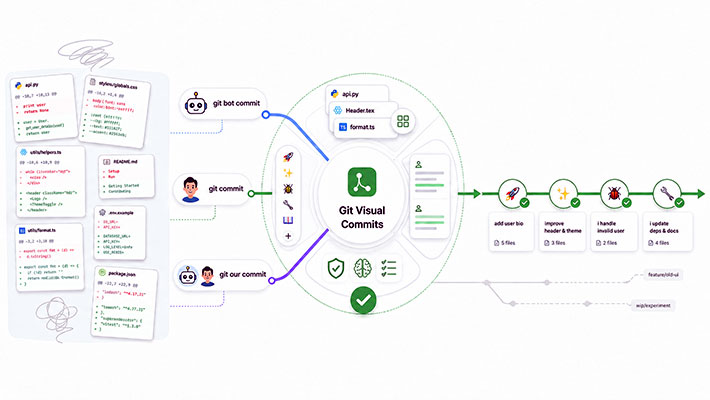
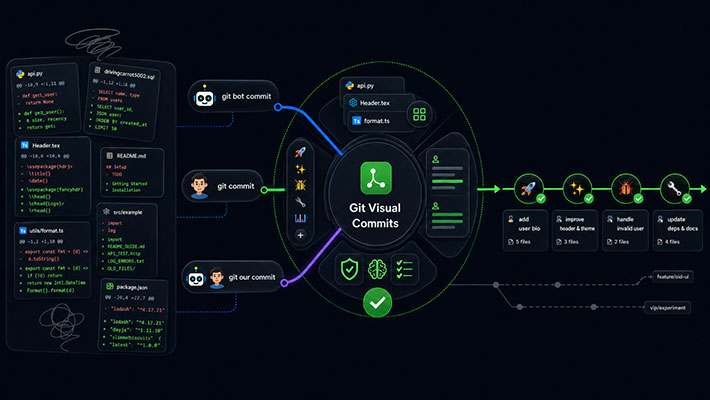
Git Visual Commits is a Codebelt agent skill that turns commit creation into a repeatable workflow. It helps an AI agent review the worktree, classify changes by semantic intent, group related files into focused commits, compose readable commit messages, and use the right git identity for the situation.
The result is a commit history that remains lean, scannable, and trustworthy — even when the implementation work was accelerated by an AI coding assistant.
This is the Codebelt approach: encode the workflow once, apply it consistently across agents, and keep the developer in control.
Why commit messages need a stronger contract
Traditional commit guidance often assumes that a human is manually deciding what to stage, how to phrase the subject, and whether the commit should be split. That assumption weakens when an AI agent is asked to "commit this" after a large implementation session.
Without a clear contract, agents tend to make the same mistakes humans make under time pressure:
- bundling unrelated changes into one umbrella commit
- generating vague subjects such as "update files" or "fix issues"
- using conventional prefixes inconsistently
- attributing AI-authored work to the wrong identity
- losing the reason behind the change
- turning the git history into a noisy transcript of the session
Git Visual Commits treats commit creation as an engineering workflow, not a formatting afterthought.
The skill is activated whenever the user asks to commit, stage files, write a commit message, review what should be committed, or use one of the explicit commit modes. That means the agent does not need a long custom prompt every time. The instruction is already encoded in the skill.
A visual language for readable history
Git Visual Commits favors visual commit subjects.
The default subject format is:
<emoji> <short description>
For example:
✨ add user submission endpoint
✅ add integration tests for submission api
♻️ extract mapper to separate class
⬆️ upgrade dependencies to latest
The emoji is not decorative. It acts as a compact semantic signal in GitHub, terminal output, release notes, review screens, and squash summaries. A reader can scan a branch and quickly distinguish features, tests, refactors, dependency updates, documentation, CI changes, and breaking changes.
The skill prefers official Gitmoji semantics first. When Gitmoji does not provide a strong enough fit, it can use an extended emoji reference for technology- or platform-specific cases such as cloud, Kubernetes, Docker, AI, background workers, or infrastructure.
This gives Codebelt a practical balance:
- use a recognizable community convention where it fits
- extend the vocabulary where modern engineering work needs more precision
- keep the subject short enough to scan
- avoid forcing every change through a small generic prefix set
Conventional commit prefixes are still available, but they are opt-in. Unless the user explicitly asks for an emoji plus conventional-commit combination, the default remains clean and visual:
✨ add submission endpoint
If the user explicitly asks for the combo form, the skill can produce:
✨ content: add submission endpoint
That distinction matters. It avoids the common problem where every commit begins to look like feat:, fix:, or chore: even when the actual intent is richer than the prefix.
The description explains why
The subject explains what changed. The description explains why it changed.
Git Visual Commits includes a body by default:
♻️ extract mapper to separate class

Separate mapping from request handling so the endpoint remains focused on transport concerns while the conversion logic can be reused by tests and future handlers.
The body is intentionally human-friendly. It should be a short explanation of the reason behind the change, not a second list of touched files. The skill avoids arbitrary 72-column hard-wrapping for short prose bodies because readability matters more than mechanical line width. A short paragraph should read like normal prose.
This is especially useful with squash-based workflows.
A pull request can carry the full implementation story: discussion, review comments, intermediate commits, screenshots, CI evidence, and design trade-offs. The final git history does not need to preserve every temporary step. It needs to preserve the meaningful outcome.
The Codebelt convention makes the squash commit description a concise, human-readable summary while leaving the pull request as the place to inspect the full picture.
That gives teams both:
- a lean main-branch history
- enough context to understand why the change exists
The history stays straight to the point. The PR remains the detailed audit trail.
Semantic grouping instead of file dumping
A good commit is not just a set of files. It is a single logical change.
Git Visual Commits requires the agent to inspect the worktree and classify changes by semantic intent before composing messages. The skill explicitly asks the agent to read the diff and determine what each change is trying to accomplish.
That means two files in the same directory do not automatically belong together. Two test-related files may still represent different intents. For example, an appsettings.test.json change describes how tests run, while a test assertion file describes what the tests verify. Those are different reasons for change and may deserve separate commits.
The skill groups by rationale, not by proximity.
A focused commit should be explainable in one sentence without needing to say "and". If the sentence becomes "update the CI pipeline and refactor the test host and add release notes", the commit is probably too broad.
This protects the history from umbrella commits such as:
✨ update project
or:
♻️ improve repo
Instead, the same work might become:
⬆️ align package versions

Pin shared package baselines so local builds and CI restore the same dependency graph.

👷 update release workflow

Move publishing automation to the shared runner path used by the rest of the repository.

💬 update release communication

Refresh the changelog and package release notes so consumers can see the supported upgrade path.
Each commit has a reason. Each reason has a clear audience. The branch remains reviewable.
Three identity modes
AI-assisted development introduces a new attribution problem. Sometimes the agent authored the change. Sometimes the human authored it and only asked the agent to commit it. Sometimes both contributed.
Important
git bot commit requires a local or global Git alias named bot.
Configure it before using the skill so bot-authored changes are committed with the intended bot identity instead of your personal Git profile.
git config --global alias.bot '!git -c user.name="<bot-name>" -c user.email="<bot-email>"'
You can verify the alias with:
git config --global --get alias.bot
Git Visual Commits makes that distinction explicit through three modes.
| Mode | Use when | Attribution |
|---|---|---|
git bot commit |
The user asks the AI to commit its own work | Bot identity, such as aicia-bot |
git commit |
The user asks to commit under the human's normal git identity | Human's configured git profile |
git our commit |
The work is collaborative or mixed | The agent analyzes authorship and assigns the right identity per group |
git bot commit
Use git bot commit when the AI agent produced the changes and should be credited as the commit author.
This is the cleanest option for agent-authored work. It keeps the repository honest by making AI-authored commits visible without adding noise to the message body.
The skill requires a git alias for this mode. If the alias is missing, the agent must stop and report the blocker. It must not silently fall back to git commit, because that would attribute bot work to the human profile.
That fail-fast behavior is important. Attribution is not cosmetic. It affects review, auditability, and the trustworthiness of the project history.
git commit
Use git commit when the human wants the commit to use the normal local git profile.
The AI still does the work of reviewing changes, grouping files, staging precisely, and writing the message. The only difference is the identity used for the commit.
This mode is useful when the human authored the changes but wants the agent to help with the mechanics and wording.
git our commit
Use git our commit when the work was collaborative.
The agent reviews the diff and separates files into groups such as:
Agent-authored:  src/UserService.cs, src/UserController.cs
Human-authored: README.md, appsettings.json
Mixed/unclear:  src/Startup.cs
It then assigns attribution per commit group:
- agent-authored groups use
git bot commit - human-authored groups use
git commit - mixed or unclear groups ask who should be credited
This gives the user a practical middle ground. Collaboration is acknowledged without stuffing every commit with Co-authored-by trailers. In a pull request workflow, GitHub already preserves the broader collaboration context. The commit identity should stay focused on who authored the change represented by that commit.
Safer automation with yolo and auto
Git Visual Commits supports auto-approval mode through words such as yolo or auto.
That mode is intentionally narrow.
It skips the approval wait, but it does not skip the engineering controls. The agent still has to review the worktree, classify changes, group by semantic intent, validate mixed scopes, and verify the commit after creation.
This makes automation faster without making it blind.
For example:
git bot commit, yolo
The agent can proceed without waiting for another confirmation, but it still has to show the commit plan and respect the same grouping and identity rules.
That is the Codebelt DevEx pattern in miniature: remove repetitive ceremony, not safety.
Optional no-body mode
The default is to include a body because the reason behind a change is often the most valuable part of the commit.
However, the skill also supports no-body or tmi when a subject-only commit is enough.
For example:
git bot commit, no-body
This suppresses the description paragraph only. It does not weaken the subject rules, semantic grouping, emoji selection, or identity verification.
That matters because a subject-only commit can still be high quality:
✏️ correct typo in release note
Not every change needs a body. But every change still needs the right scope and meaning.
Verification after the commit
The workflow does not end when the commit command runs.
Git Visual Commits requires post-commit verification. The agent checks the stored author and the stored commit message body. If the author does not match the requested identity mode, the commit is invalid. If the body contains literal \n escape sequences instead of real line breaks, the commit is invalid. If a short prose body was split mid-sentence only to satisfy a column-width habit, the commit is invalid.
That verification step turns commit creation from "the command succeeded" into "the repository contains the right result."
This is a small distinction with large practical value. It prevents subtle mistakes from becoming permanent history.
Why this is more DevEx friendly
The Codebelt approach is not to ask every developer to remember a long checklist before each commit. The workflow is encoded as a reusable skill.
That has direct DevEx benefits:
- Developers can use natural language such as "commit your changes" or "git bot commit, yolo".
- Agents get consistent rules across sessions and supported tools.
- Commit subjects become easier to scan.
- Descriptions focus on why the change exists.
- Bot and human attribution stays explicit.
- Squash histories remain lean without losing context.
- The pull request remains the place for the full implementation story.
- Validation happens as part of the workflow, not as a manual afterthought.
The result is less prompt engineering and fewer repeated corrections.
Instead of spending time teaching every agent how the repository wants commits to look, the team can rely on the skill to apply the convention.
Fast feedback. Less code. Cleaner history.
The bigger picture: agentic skills as engineering policy
The codebeltnet/agentic repository is a curated collection of skills for repeatable Codebelt workflows. A skill is a Markdown instruction set that an AI agent reads before responding. When the skill is active, the agent follows those rules consistently across supported environments.
Git Visual Commits applies that idea to one of the most common developer actions: committing changes.
That makes it more than a commit-message template. It is a small governance layer for agentic development. It defines how changes are reviewed, how intent is classified, how commits are grouped, how messages are written, how identity is selected, and how the result is verified.
For teams adopting AI agents in real repositories, that kind of workflow matters.
Agentic development does not remove the need for engineering discipline. It raises the value of encoding discipline where the agent can actually use it.
Recommended usage
Use git bot commit when the agent authored the changes and the commit should be attributed to a bot identity.
Use git commit when the human authored the changes and wants the agent to help stage, group, and write the commit under the human's normal profile.
Use git our commit when the work is collaborative and the agent should break down authorship before committing.
Add yolo or auto when the grouping and identity rules should still run, but the user does not want to stop for confirmation.
Add no-body or tmi only when the change is obvious enough that a subject line carries the necessary context.
Conclusion
Git history should be useful after the merge.
Git Visual Commits helps make that happen by combining visual subjects, human-friendly descriptions, semantic grouping, explicit attribution, and post-commit verification into one repeatable agent workflow.
It keeps the main branch readable while preserving the pull request as the full source of truth.
That is the practical value of the Codebelt way: reliable conventions, applied consistently, with less repeated instruction and faster developer feedback.
Timeline
Version links point to the first relevant tag when one exists.
v0.1.02026-03-15The first emoji-first commit skill lived in
codebeltnet/agentic.Earliest observed in this checkout,
skills/git-visual-commits/SKILL.mdintroduced the Gitmoji-first subject contract, bot/human/our identity modes, and reviewable commit plans on the repository's initial skill suite. The agentic checkout is shallow, so this is the earliest implementation visible locally rather than a proven repository-wide origin.v0.2.02026-03-16Hardening added identity and grouping safety.
The skill locked
git bot committo thealias.botidentity, addedyolo/autoguardrails, rejected umbrella commits, required description bodies by default withno-body/tmiopt-out, and introduced post-commit author/body verification.v0.3.02026-03-17Commit language extracted to a shared reference.
The emoji and prefix vocabulary moved from an inline catalog to
skills/git-visual-commits/references/commit-language.md, duplicated byte-for-byte withskills/git-visual-squash-summary/references/commit-language.mdand enforced by CI sync checks. The complementarygit-visual-squash-summaryskill arrived in the same release.v0.8.02026-07-18Deterministic validation and full-skill-read gate became mandatory.
The bundled
scripts/validate-commit-subject.ps1validator and itstest-commit-subject.ps1harness enforced the emoji table, single-space separator, lowercase description, and 70-character limit, and the skill required reading the entireSKILL.mdthrough EOF before any Git command, with validation before the plan and again before the commit.v0.9.12026-08-22(current)The active contracts live in
codebeltnet/agenticwith an invocation routing lock.git bot commit,git commit, andgit our commitbecame authoritative skill selectors soyolo/autonever route to a changelog or squash-summary workflow, and allcodebeltnet/agenticskill descriptions were refactored to lean progressive-disclosure triggers. The news article itself documents the skill for codebelt.net readers; the source of truth remains the skill directory in the agentic repository.